Resend and Postmark are both transactional email platforms, but they solve different infrastructure problems. Resend is an API wrapper optimized for React and Next.js applications, designed for developer velocity. Postmark is a dedicated MTA (Message Transfer Agent) system that has been running since 2010, designed for mail stream isolation and reputation defense. The architectural difference is fundamental: Resend abstracts email delivery behind a modern API with React Email components; Postmark enforces mandatory message stream separation between transactional and broadcast traffic to prevent reputation contamination. For developers on constrained teams, this distinction determines whether you spend time building email features or defending against infrastructure failures.
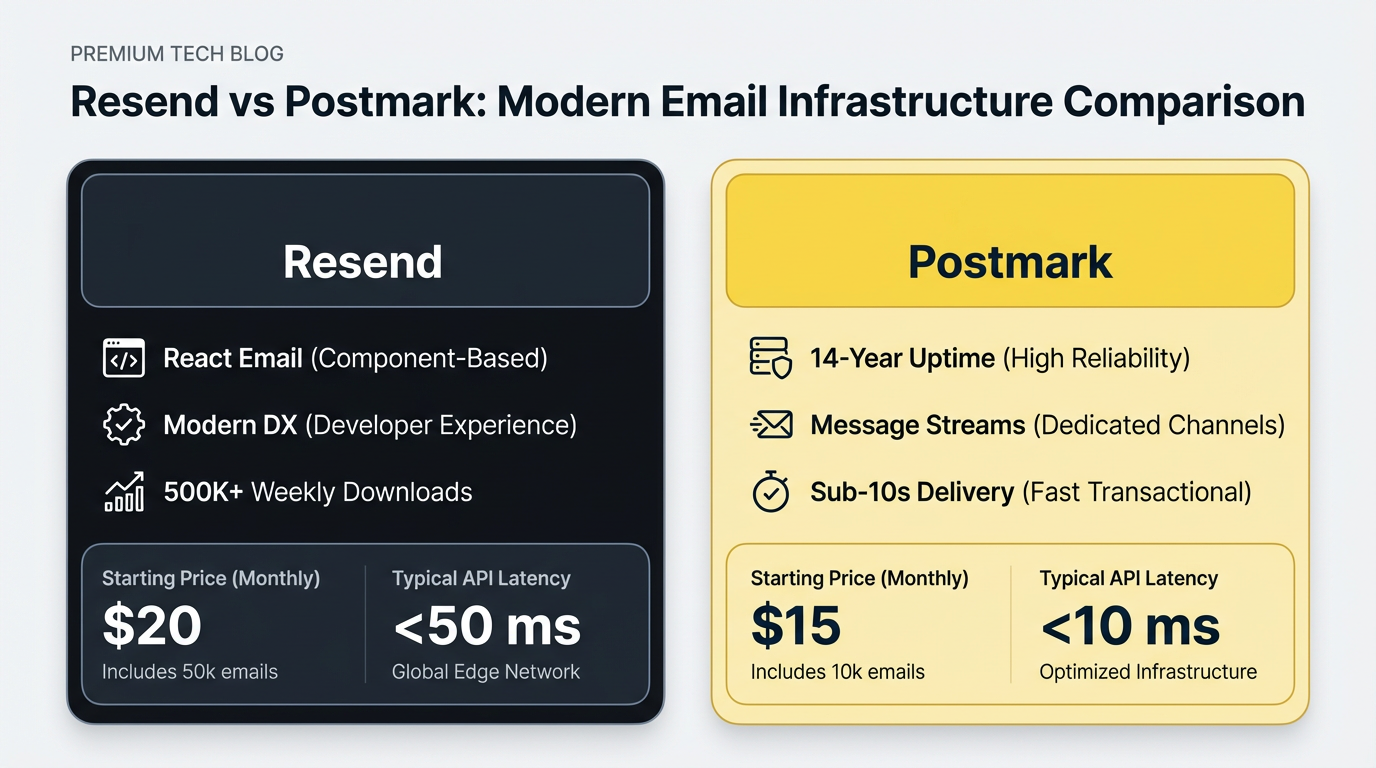
Comparison table
| Feature | Resend | Postmark |
|---|---|---|
| Founding | 2022 | 2010 |
| Core use case | React/Next.js native email | Bare-metal transactional reliability |
| API architecture | High-level REST wrapper | Low-level MTA control |
| Message streams | Shared pool by default | Mandatory per-traffic-type isolation |
| Entry price | $0 (3,000 emails/month free) | $15/month (10,000 emails) |
| Inbox placement | Modern shared infrastructure | Industry-leading, documented track record |
| Time to inbox | Sub-second API response | Consistently under 10 seconds |
| Inbound email | Available with webhooks | Available with webhooks |
| Webhook payloads | Simplified structure | Detailed bounce/complaint data |
| Best for | Product teams shipping fast | Mission-critical transactional email |
What is the core difference between Resend and Postmark?
Resend is a developer API wrapper built on managed cloud infrastructure. Postmark is a dedicated MTA operator with isolated message streams and enforced separation of broadcast from transactional traffic. Resend abstracts away infrastructure complexity. You write JSX email components, drop them into your codebase, and send via REST API. The platform handles DNS setup, domain verification, and credential management. Postmark requires you to understand message streams, a concept that enforces hard boundaries between different email types. On Postmark, you cannot send password resets and marketing emails through the same stream. This is not a limitation; it is a core design for reputation defense. When a marketing broadcast triggers complaints, your transactional stream remains isolated and continues to hit the inbox. Resend uses a shared default pool for all traffic types unless you add dedicated IPs as an add-on (pricing available on their enterprise tier).
Comparing Resend, Postmark & Loops - Email APIs for SaaS by PlanetNoCode
The second-order consequence is cost structure. Resend's Pro plan is $20 per month for 50,000 emails, with overage billed at $1.30 per 1,000. The Scale plan is $90 per month for 100,000 emails. Postmark charges flat-rate tiers starting at $15 per month. For small teams under 50,000 monthly emails, Resend's developer experience often justifies the overhead. For high-volume senders, Postmark's infrastructure ownership becomes a meaningful advantage, as research from marketingemailtools.com highlights in their feature-by-feature comparison.
Postmark vs Resend deliverability and strict message streams
Postmark enforces message stream separation, which isolates transactional and broadcast traffic into separate IP pools with independent reputation scores. Resend defaults to a shared pool unless you configure dedicated IPs. Postmark's message stream isolation is the primary reason it maintains strong inbox placement on critical transactional emails. A message stream is a logical container for a specific email type. When you send a password reset through the transactional stream and a marketing newsletter through the broadcast stream, each maintains its own reputation score independent of the other. A sudden spike in spam complaints from a newsletter campaign does not affect your password reset delivery.
Resend does not enforce this separation by default. All traffic flows through the same infrastructure pool. When you ship your first marketing campaign alongside your transactional flows, both compete for the same reputation. If the campaign triggers complaint rates above a threshold, it can affect your transactional delivery. To avoid this, you either use a separate domain for marketing (requiring additional DNS setup) or purchase dedicated IPs. In practice, Postmark's approach prevents a specific failure mode: a product manager runs a growth campaign without notifying the engineering team, and password resets emails start degrading. On Postmark, this cannot happen because the streams are isolated. On Resend, you have to configure the separation yourself beforehand.
Loops.so vs Resend - Battle of the Email APIs by PlanetNoCode
Postmark publishes time-to-inbox figures consistently under 10 seconds for transactional traffic. For mission-critical emails, delivery consistency matters more than average delivery time. Postmark's enforced isolation also eliminates configuration drift; you cannot accidentally mix traffic types because the infrastructure prevents it. Resend requires discipline in your application code to route different traffic types to different endpoints. According to pkgpulse.com, this distinction is particularly relevant for Node.js applications where infrastructure reliability is a key consideration.
How do Resend and Postmark handle inbound parse webhooks?
Inbound email parsing is how platforms extract structured data from incoming emails and route them to your application logic. Resend and Postmark differ in webhook payload structure, attachment limits, and the data included per event. Postmark's inbound webhook payload includes these root-level fields: FromFull (sender details), To, Cc, Bcc (all recipients), Subject, TextBody, HtmlBody, Tag, MailboxHash, an Attachments array, and Headers. Attachments are limited to 10 MB per email. The webhook is configurable per domain, and you set a single inbound address like support@yourdomain.com, which routes all incoming mail to your endpoint in real time.
Resend also supports real-time webhooks for inbound email events, so you do receive push notifications for incoming messages. The key difference is in payload depth: Resend delivers inbound metadata via the webhook but requires a separate API call to retrieve full attachment content. Postmark includes attachment metadata (filename, content type, size) inline in the webhook payload, so you can evaluate and process attachments immediately without an extra round trip. For a customer support system handling high inbound volume, that additional API call per message compounds into meaningful overhead. Resend's inbound attachment limit is 40 MB per email, which is larger than Postmark's 10 MB cap. For two-way email workflows like support tickets or notification replies, Postmark's complete inline payload simplifies the processing pipeline, while Resend's higher attachment limit may matter for document-heavy workflows.
Pricing comparison from startup tiers to 500k monthly volume
Postmark's flat-rate tiers become cheaper than Resend's overage model somewhere between 50,000 and 100,000 monthly emails. Here is the cost at different volumes using current public pricing:
| Volume | Resend | Postmark (flat tiers) |
|---|---|---|
| 10K | $0 (free tier) | $15 |
| 50K | $20 (Pro, no overage) | ~$30 |
| 100K | $85 (Scale $90 minus 100K included, or Pro $20 + 50K overage at $1.30 = $85) | ~$75 |
| 500K | Enterprise/contact sales | Enterprise/contact sales |
Note: Postmark's exact mid-tier pricing and 500K tier require verification at their official pricing page, as high-volume plans are often negotiated. Resend's Scale plan at $90/month covers 100,000 emails; volumes beyond that move into enterprise territory for both platforms.
At moderate volumes (50,000 to 100,000 per month), the cost difference is small enough that developer experience often drives the decision. The story changes if you factor in engineering time. Resend's React Email library can save weeks of template engineering for teams with React or Next.js stacks. If that saves 40 hours of engineering work, the cost overhead at mid-tier volumes is absorbed quickly. The calculation flips for teams already managing server-side templates; they are not getting that time savings, so Postmark's flat pricing is the more straightforward choice.
Nodemailer vs Resend vs Sendgrid (2026) - Which One Is BEST? by Paperclick
For teams migrating from SendGrid or Mailgun, the switching cost to Postmark is lower. You are already managing templates server-side, so Postmark's template API feels familiar. Resend makes the most sense as a greenfield choice for React-native stacks.
Bounce management and automated suppression logic
Both platforms automatically suppress hard bounces to protect account reputation. A hard bounce occurs when an email address is invalid or does not exist on the recipient's mail server (a permanent failure). Soft bounces are temporary failures like a full mailbox. A complaint occurs when a recipient marks your email as spam.
Postmark suppresses hard bounces after the first attempt. Once an address bounces hard, Postmark adds it to your suppression list and refuses to send to it again until you manually remove it. The bounce webhook includes a Bounce event with type (hard or soft), bounce subtype (such as General or Mailbox Full), and the bounced address. Your application can subscribe to this webhook and automatically remove the address from your database. Postmark exposes historical bounce data via their API, giving you the ability to query past bounce patterns for reputation analysis, though exact retention periods are not prominently documented.
Resend uses a similar model but exposes less detail. The bounce webhook includes the email address and bounce reason but does not break down hard versus soft explicitly. You must parse the reason string to determine the bounce type. Message history retention varies by plan: Free retains 1 day, Pro retains 3 days, and Scale retains 7 days. This limits your ability to analyze historical bounce patterns or audit compliance for anything that occurred more than a week ago on lower-tier plans.
For complaint events, neither platform auto-pauses sending when complaint rates spike. If your monitoring fails, high complaint rates can damage your domain reputation before anyone intervenes. Platforms like Transmit address this with domain-level reputation monitoring and automatic send throttling, which is worth considering if you are operating a multi-tenant SaaS where one customer's sending behavior could affect others.
Developer experience: React Email integration vs legacy REST APIs
Resend is optimized for developers using React and Next.js via the React Email library, which compiles JSX components to valid HTML email output. Postmark requires managing templates server-side using their REST API or SMTP, either through the dashboard or by uploading via API. With Resend, you write email templates as components:
export function PasswordResetEmail({ resetLink }) {
  return (
    <Html>
      <Body>
        <Text>
          Reset your password: <a href={resetLink}>{resetLink}</a>
        </Text>
      </Body>
    </Html>
  );
}
You import this component into your backend, pass variables, and send via the REST API. The template lives in your codebase, versioned with your backend code, tested in the same CI/CD pipeline, and deployed atomically with your application logic. This removes the version drift problem where your application expects a template variable that the email platform does not yet have, causing silent send failures.
Postmark templates are more flexible for non-technical editors. A marketing team member can update a template in the dashboard without a code deployment. For teams with dedicated email designers or marketing automation needs, this matters. For product engineers who own the full stack, Resend's code co-location reduces debugging overhead and deploy friction considerably.
The practical distinction: if your engineering team reviews email templates in pull requests and deploys them alongside feature code, Resend's model fits that workflow directly. If your email templates are owned by a marketing or CX team that updates copy independently of engineering releases, Postmark's dashboard-editable templates are the lower-friction option. As veldsystems.com notes, this distinction is particularly relevant for teams prioritizing onboarding and security.
When to bypass both and bring your own AWS credentials
For teams sending over 500,000 monthly emails or requiring strong reputation isolation per customer, using Amazon SES through a managed API layer removes per-email overages and enables per-customer IP pools. Amazon SES prices at $0.10 per 1,000 emails for outbound sending, with dedicated IPs available at an additional monthly cost per IP. At 500,000 emails per month, raw SES sending fees are roughly $50. Both Resend and Postmark move into enterprise or custom pricing territory at that volume, so the gap widens significantly.
With raw SES, you own IP reputation entirely. Sending to a stale list or missing a complaint rate spike affects your IP warmup and inbox placement immediately, with no managed safety net. You handle bounce processing via SES SNS topics directly, which requires infrastructure expertise and active monitoring. A managed API layer on top of SES handles reputation isolation without requiring you to build the plumbing yourself. Transmit's BYOK infrastructure, for example, lets you segment customers into separate IP pools so one customer's complaint rate never affects another's sending pool, which is the critical protection for multi-tenant SaaS platforms sending on behalf of multiple accounts.
The decision is straightforward at scale: single-tenant products sending 500,000 or more emails monthly benefit from the cost reduction of raw SES via a managed layer. Early-stage teams under 100,000 emails are better served by Resend's simplicity or Postmark's reliability without the added infrastructure overhead.
Which should you choose?
Choose Resend when your team is React or Next.js native and you want email components versioned alongside your application code. It works well for teams under 50,000 monthly emails where the cost overhead is acceptable and developer velocity is the priority. It is also the right default for new products where you want to ship fast without standing up email infrastructure.
Choose Postmark when your email delivery is tied directly to user trust: authentication emails, payment confirmations, password resets. The mandatory message stream isolation prevents cross-contamination between transactional and marketing traffic without any configuration discipline required from your application code. Postmark's detailed bounce webhook payloads and real-time inbound processing also make it the stronger choice for two-way email workflows.
Use raw SES via a managed layer when you exceed 500,000 monthly emails and cost optimization is the primary constraint, or when you operate a multi-tenant SaaS and need per-customer reputation isolation. Both Resend and Postmark expose standard REST APIs, so the switching cost at any stage is lower than it looks. You port your integration, update your DNS records, and migrate your suppression list.
Related Reading
- Compare Resend alternatives for teams evaluating other transactional email platforms.
- Postmark vs SendGrid comparison for teams migrating from legacy providers.
- Loops vs Resend breakdown for developers considering modern email APIs.
Frequently asked questions
Does Resend support message stream isolation like Postmark?
Resend does not enforce message streams by default. You can simulate isolation by using separate domains for transactional and marketing emails, but this requires managing multiple domain setups and DNS records. Postmark's approach is mandatory and automatic, requiring no additional configuration beyond initial stream setup.
What is the attachment size limit for inbound email on each platform?
Postmark allows up to 10 MB per inbound email. Resend supports up to 40 MB per email attachment. The right choice depends on your use case: Resend's higher limit is better for document-heavy inbound workflows, while Postmark's complete inline attachment metadata simplifies processing pipelines that need to evaluate files before downloading them.
How long does each platform retain message history?
Postmark retains bounce and delivery records for historical analysis via their API, though exact retention windows are not prominently published. Resend retention varies by plan: Free retains 1 day, Pro retains 3 days, and Scale retains 7 days. For compliance auditing or debugging deliverability issues beyond short windows, this is a meaningful operational constraint on Resend's lower-tier plans. Moosend estimates Postmark's deliverability at 82% compared to competitors.
Can I switch from Resend to Postmark without losing email history?
Both platforms store message history separately from your application. You can export delivery logs from Resend within the retention window via webhooks or analytics exports, but there is no native migration tool. If audit trails are critical for compliance, query and archive both APIs before switching.
Does Resend offer DKIM and SPF setup as easily as Postmark?
Both platforms offer guided DNS setup for DKIM, SPF, and DMARC. Resend's domain verification process is straightforward with one-click DNS record generation. Postmark's setup is similarly structured. The tooling is comparable between the two platforms for initial domain authentication.
When does Postmark's pricing become cheaper than Resend?
For teams on Resend's Pro plan ($20 per month for 50,000 emails), costs stay flat up to the plan limit. Once you exceed 50,000 emails, overage is billed at $1.30 per 1,000, which adds up quickly. Postmark's flat-rate tiers scale more predictably at higher volumes, making it the more cost-efficient option for consistent senders above 100,000 emails per month.