An overview of two fundamentally different architectures
Loops.so is a contact-based marketing automation platform built for SaaS teams. It bills by audience size, includes a built-in contact manager, and treats email as part of a broader communication stack with visual workflow editors and campaign analytics. Resend is a developer-first email API that supports both transactional and marketing sends. It bills by email volume, includes audience management tools, and prioritizes API performance through native React Email support and language SDKs.
These are not two versions of the same tool. They solve different problems at different infrastructure layers. The choice depends on whether your team prioritizes operational simplicity (Loops) or infrastructure flexibility (Resend).
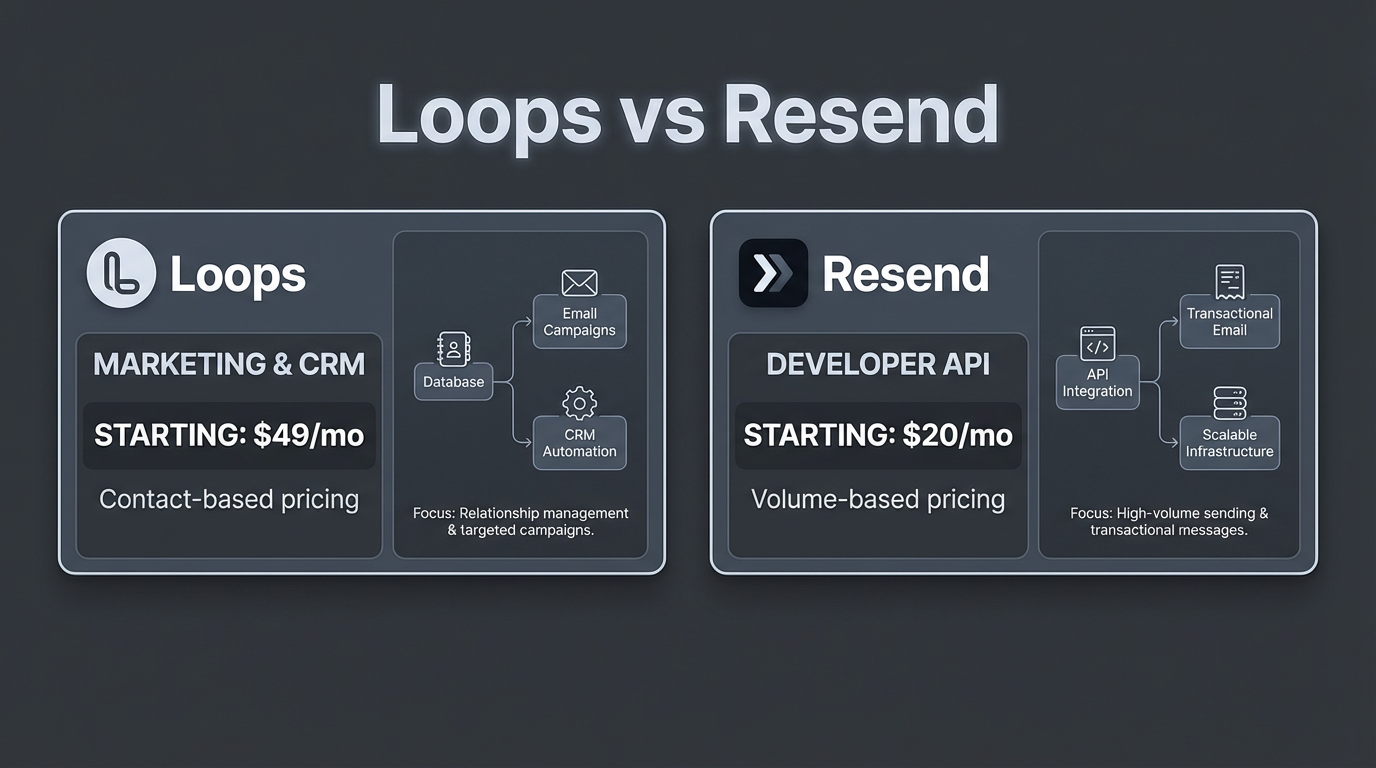
Quick comparison: core features and pricing
| Feature | Loops.so | Resend |
|---|---|---|
| Pricing model | Contact-based subscription | Volume-based pay-as-you-go |
| Free tier | None (starts at $49/month) | 3,000 emails/month |
| Entry pricing | $49/month (up to 5,000 subscribers, unlimited emails) | $20/month Pro (50K emails, overages apply) |
| 100K emails/month cost | Depends on subscriber count | $90/month (Scale plan) |
| Official SDKs | JavaScript, Nuxt (others community-maintained) | Node, Python, and others via OpenAPI |
| React Email support | No (visual editor only) | Native |
| Contact management | Built-in with lists and fields | Included (audience management tools) |
| Inbound email handling | Not confirmed | Via webhooks |
| Multi-tenant reputation | Not publicly documented | Not publicly documented |
What are the core differences between Loops.so and Resend?
Loops and Resend differ most clearly in their billing model and what they bundle. Loops charges a fixed monthly fee based on subscriber count: $49/month covers up to 5,000 subscribers with unlimited email sends. That makes costs predictable if your audience is stable, but the model penalizes teams whose contact list grows faster than their send volume. Resend charges per email sent, starting at $20/month for 50,000 emails on the Pro plan, with the Scale plan covering 100,000 emails for $90/month.
Loops includes an internal contact database with list management, segmentation fields, and campaign scheduling built into the platform. You import or sync contacts, organize them into lists, and send directly from Loops' interface or API. Resend also includes audience management tools alongside its API, so the gap here is narrower than older comparisons suggest.
The sharper difference is architectural. Loops treats every contact as a first-class record in its own platform. If you send high-frequency transactional emails to users already in your Loops subscriber list, you pay for those contacts once per billing tier regardless of how many emails each one receives. Resend's model charges per send, so costs scale with email volume rather than audience size. For applications sending many emails per user per month, Resend's model is cheaper. For teams with large contact lists and low send frequency, Loops may cost less.
Loops.so vs Resend - Battle of the Email APIs by PlanetNoCode
Pricing models and high-volume infrastructure costs
At moderate volumes, the pricing gap between Loops and Resend is small. At 5,000 subscribers and 40,000 monthly emails, Loops costs $49 and Resend's Pro plan handles it at $20 plus potential overages. Scale to 50,000 subscribers and the picture shifts: Loops' published pricing reaches $249/month for up to 50,000 subscribers. On Resend, 400,000 monthly emails (8 per subscriber) would exceed the Scale plan's 100,000-email tier, and costs would increase incrementally based on volume.
The crossover point depends heavily on your email-to-contact ratio. If each subscriber receives two or three emails per month, Loops' flat per-contact model is straightforward. If subscribers trigger dozens of automated emails (activity notifications, digests, reminders), you pay the same Loops tier while Resend costs scale linearly with what you actually send.
Resend publishes clear tier pricing: $20/month for 50K emails (Pro) and $90/month for 100K emails (Scale). Loops publishes $49/month for 5,000 subscribers and $249/month for 50,000 subscribers. Beyond 50,000 subscribers, Loops moves to custom pricing. For very high contact volumes, you should contact Loops directly rather than extrapolating from published tiers.
On dedicated IPs: Resend offers a dedicated IP as an add-on for Scale plan users and includes it in Enterprise. This matters for high-volume senders who want to isolate their sending reputation from shared infrastructure. Loops does not publicly document dedicated IP options, which is worth confirming before committing at high volume.
Comparing Resend, Postmark & Loops - Email APIs for SaaS by PlanetNoCode
Developer experience, SDKs, and React Email parity
Resend generates its SDKs from an OpenAPI specification, which means SDK updates track API changes automatically and error types are consistent across languages. The published SDKs include Node.js and Python, with additional options available. Loops focuses primarily on JavaScript and a Nuxt package; SDKs for other languages exist but are community-maintained, meaning bug fixes and version compatibility depend on contributors rather than the Loops team.
For a Go or Ruby backend, this is a real operational difference. Community SDKs sometimes lag behind API changes by weeks or months, and issues may go unresolved if the maintainer moves on. Teams in those languages should verify the SDK status before committing to Loops.
Rate limits are worth investigating directly before building at scale. Loops documents API rate limits in their developer documentation; confirm the specific limits for your use case before architecting batch sends or high-frequency triggers. Any email API at significant volume requires queuing and retry logic with backoff; neither platform is exempt from this.
React Email support is a genuine differentiator for developer teams. React Email is an open-source library for building email templates in JSX. Resend renders React Email components directly, which means templates live in your codebase, go through code review, and deploy alongside application code. Loops uses a visual editor. Loops' visual editor avoids code edits entirely, which suits non-technical content owners, but it prevents version-controlled templates and CI/CD integration. For an engineering team that already reviews every UI component as a pull request, putting email templates outside that workflow adds a separate change-management process.
How do Loops and Resend handle B2B SaaS multi-tenancy?
Multi-tenant B2B SaaS applications often send email on behalf of their customers: a project management tool sending task notifications from a client's subdomain, or a CRM platform delivering outbound sequences using a client's sending domain. This requires domain verification (SPF, DKIM, DMARC) per customer and, ideally, reputation isolation so that one customer's high bounce rate does not affect deliverability for others.
Neither Loops nor Resend publicly documents how they handle reputation isolation between customers on shared infrastructure. Both support custom domain authentication, so you can configure SPF and DKIM records per sending domain. What is less clear from their public documentation is whether bounce rates, complaint rates, and blacklist status are isolated per domain or aggregated at the account or infrastructure level.
This distinction matters in practice. If you run a platform where 200 customer accounts send email through your application, and one customer sends to an outdated list and generates a spike in complaints, you need confidence that this does not degrade deliverability for the other 199. At small scale, shared infrastructure risk is low. At large scale (hundreds of customer domains, millions of monthly sends), dedicated IP pools per customer or per customer cohort become necessary.
For platforms where multi-tenant reputation isolation is a hard requirement, Transmit offers per-domain sending pools as a core feature, alongside managed and BYOK AWS infrastructure, so each customer's sending reputation is isolated by default rather than bolted on later.
Audience management vs external database syncs
Loops includes contact management as a first-class feature. You import a CSV, create lists, add custom fields for segmentation (plan type, region, signup date), and send campaigns or automated sequences directly from the platform. Unsubscribes are recorded and suppressed automatically. For a two-person team without a dedicated backend engineer, this is the primary appeal: no data pipeline to build.
Resend's audience management tools let you store contacts and send to them via the API. But if you already maintain a user database in Postgres, MongoDB, or another store, the question is whether you sync that data into Resend or query it directly at send time. For transactional emails, you typically call the Resend API at the moment an event occurs (user signs up, order completes) and pass recipient details in the request. For marketing broadcasts to a filtered segment, you need to query your database, build the recipient list, and iterate through it with proper rate limiting and error handling.
This is the engineering cost the two tools impose differently. With Loops, a marketer can log in and send a campaign to a filtered segment without touching the codebase. With Resend, a developer needs to write (or already have written) a background job that queries the user table, chunks recipients, handles rate limits, and retries failures. Teams already running job queues (via Bull, Sidekiq, or similar) add Resend naturally. Teams without that infrastructure build it first.
The portability tradeoff is worth considering. If your audience data lives in Loops, switching email platforms later means exporting contacts and re-importing elsewhere. If your audience data lives in your own database, switching email providers is a one-line API endpoint change.
Nodemailer vs Resend vs Sendgrid (2026) - Which One Is BEST? by Paperclick
Which should you choose?
Choose Resend if your team writes backend code regularly, sends primarily transactional or event-triggered emails, and already has a user database. You pay per send rather than per contact, get native React Email support, and keep audience data in your own infrastructure.
Choose Loops.so if you need marketing automation alongside transactional emails, want non-technical teammates to run campaigns without engineering support, and your subscriber count is stable and predictable. The $49/month entry point for 5,000 subscribers includes unlimited sends, which is good value if your primary use case is campaigns and onboarding sequences.
For teams evaluating both: many applications use Resend for transactional sends and a separate tool for marketing campaigns. This is a legitimate architecture, but it means maintaining two platforms and deciding which one holds the canonical contact record.
For B2B platforms sending on behalf of customer accounts at scale, the reputation isolation question is the most important one neither platform fully answers in its public documentation. Verify directly with each vendor how bounce rates and complaint handling work per domain before building a multi-tenant email pipeline on top of shared infrastructure. According to research from The Startup Starter Kit, understanding these nuances is critical for long-term deliverability.
Related Reading
- Transmit vs Loops - Email Platform Comparison – Detailed comparison of Transmit and Loops for SaaS email infrastructure.
- Best Postmark Alternatives in 2026 – Ranked alternatives to Postmark for transactional email.
- Resend vs Postmark Comparison – How Resend stacks up against Postmark for API-driven email.
- Resend vs SendGrid Comparison – Feature and pricing comparison between Resend and SendGrid.
Frequently asked questions
Can you use Loops and Resend together?
Yes. A common pattern is using Resend for transactional emails (event-triggered sends at the API layer) and Loops for marketing campaigns (newsletters, onboarding sequences managed in the visual editor). The coordination requires a clear decision about which system holds the authoritative contact record, and you need to ensure unsubscribes in one platform suppress sends in the other. This adds operational overhead but lets each tool do what it does best.
Does Resend support SMTP, or only the REST API?
Resend's primary integration is the REST API. Its documentation and SDKs focus on API-based sending. If your application requires SMTP (legacy systems, WordPress plugins, or tools that only support SMTP relay), confirm SMTP support with Resend directly before assuming it is available. Loops is the more established choice for SMTP-dependent workflows.
What happens to your contacts if you leave Loops?
Loops allows contact export as CSV. The data is yours, but moving to another platform requires importing that CSV and reconfiguring lists, segments, and suppression records. If your audience data lives in your own database and you use Resend, switching providers involves changing API credentials rather than migrating contact records.
Does Resend handle bounces and unsubscribes automatically?
Resend tracks bounces and complaints and surfaces them via webhooks. Your application needs to consume those webhook events and update your contact records accordingly (marking invalid addresses, honoring unsubscribes). Loops handles suppression automatically within the platform, which reduces engineering work for teams without existing webhook infrastructure.
At what email volume does Resend become cheaper than Loops?
The crossover depends on the ratio of emails sent to contacts stored. Loops charges $49/month for up to 5,000 subscribers and $249/month for up to 50,000 subscribers, with unlimited sends included. Resend's Scale plan is $90/month for 100,000 emails. If you have 50,000 subscribers but send only one email per month to each, Loops at $249 is more expensive than Resend at $90. If you have 5,000 subscribers but send 20 emails per user per month (100,000 total), Loops at $49 is cheaper than Resend at $90. The math favors Resend when email volume significantly exceeds subscriber count, and favors Loops when subscriber count is large relative to send frequency.