A technical alternative to Mailgun is an email delivery platform that offers a REST or SMTP API for sending transactional and marketing messages, combined with webhook routing for inbound email handling and real-time event tracking. Unlike generic comparisons that focus on UI polish or free tier limits, the right alternative reduces engineering overhead during migration by minimizing API endpoint rewrites, simplifying webhook authentication, and providing automated reputation recovery tools. For developers evaluating Mailgun replacements, the total cost of ownership extends beyond monthly subscription fees to include API translation effort, DNS configuration downtime, and lost deliverability during sender reputation rebuilding.
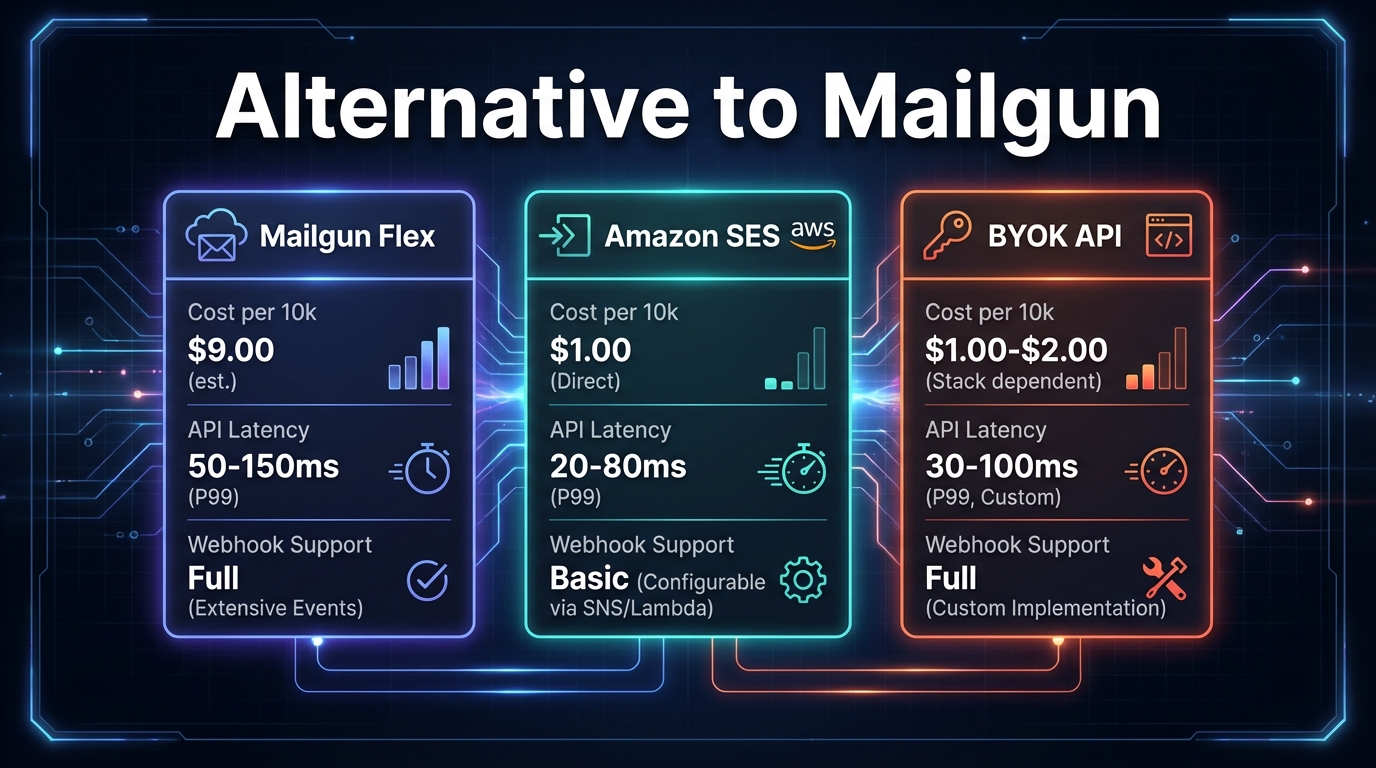
Comparison table: Mailgun and technical alternatives at a glance
| Feature | Mailgun | Amazon SES | Postmark |
|---|---|---|---|
| API type | REST, SMTP | REST, SMTP | REST, SMTP |
| Transactional latency | Variable; no public SLA | Variable; no public SLA | Advertises fast delivery; no exact public benchmark |
| BYOK AWS infrastructure | No | N/A (native AWS) | No |
| Per-domain reputation isolation | Shared IP default | Shared pool default | Dedicated IP as paid add-on |
| Domain warmup automation | Manual or third-party | Manual | Manual |
| Inbound email routing | Webhook-based routing | Via Receipt Rules (requires setup) | Limited |
| Pay-as-you-go pricing | Tiered with volume scaling | Yes, $0.10 per 1,000 emails | Monthly quota with overage |
| Email validation (syntax, MX, disposable) | Separate Validation API | Not included | Not included |
What is the engineering cost of switching from Mailgun?
Migrating from Mailgun requires rewriting API calls, translating webhook payloads, and adjusting inbound email parsing logic. The complexity depends on how deeply Mailgun's SDK is integrated into your codebase. Based on observed migrations, a typical transition for a mid-scale SaaS involves four distinct engineering phases, each with real time investment that varies by stack and integration depth.
First, API endpoint translation typically takes several developer hours. Mailgun's REST endpoint (POST https://api.mailgun.net/v3/domain/messages) maps cleanly to most alternatives, but custom Mailgun headers and message tags require remapping logic. If your application uses Mailgun's Python SDK (mailgun.messages.send()), switching to a different provider's call requires grep-and-replace operations across your codebase, plus regression testing of all transactional endpoints (password resets, order confirmations, support notifications). Most alternatives share similar REST schemas, but SDKs have subtle behavioral differences in error handling and retry logic.
Mailgun alternative for Email API by Mailtrap
Second, webhook verification adds meaningful time. Mailgun signs webhooks with HMAC-SHA256 tokens that your application validates through a shared API key. Switching providers means rewriting your verification middleware to accept the new provider's secret key format. If you process bounces, complaints, or delivery events downstream (updating user contact status, triggering re-engagement sequences, or logging failures), misaligned webhook payloads cause silent failures until you catch them in production logs.
Third, inbound email parsing can require significant refactoring. If your product accepts incoming replies, support tickets, or form submissions via email, you are likely parsing inbound payload structures, extracting attachments, and routing them to webhooks. Each provider has a different attachment storage approach, MIME parsing depth, and payload encoding. Testing this requires setting up test email accounts and sending samples through each alternative to verify parsing behavior.
Fourth, DNS and authentication configuration introduces downtime risk. Moving domains means updating SPF records to include the new sender's infrastructure, replacing DKIM keys with the new provider's signing servers, and configuring DMARC policies. During this window, emails may be flagged as unsigned or fail authentication entirely, causing inbox placement to drop temporarily. Many providers now offer DNS automation (one-click DKIM and SPF verification), which reduces manual error but still requires downtime coordination.
The total migration for a well-integrated codebase is realistically one developer-week of work when you factor in endpoint translation, webhook rewriting, inbound parsing, DNS changes, and the regression testing needed to confirm nothing broke. Research from Postmark found that teams often underestimate the effort required for webhook signature verification and inbound email parsing, which can double the expected migration timeline.
Why are developers searching for a Mailgun flex PAYG alternative?
Mailgun's pricing structure has shifted in recent years. The platform moved away from models that allowed low-cost entry with pay-as-you-go overages toward tiered commitments, and by 2025 the Scale plan ran around $100 per month for 50,000 emails. That change created real demand for true pay-as-you-go infrastructure, particularly among teams with variable sending volumes.
What does pay-as-you-go mean in email APIs? Pay-as-you-go email infrastructure charges only for emails actually sent, with no monthly minimum or tier lock-in. Amazon SES costs $0.10 per 1,000 emails (for outbound mail sent from outside of Amazon EC2, after a free tier threshold). A team sending 500,000 emails monthly pays $50; one sending 5 million pays $500. Tiered models force you into a monthly commitment even when usage fluctuates significantly.
How does PAYG cost scaling compare to fixed tiers? Consider a startup sending 50,000 emails monthly during onboarding, scaling to 200,000 by month six. Under a tiered model, you move up a pricing band at each threshold. Under Amazon SES PAYG, you pay only for what you send. The gap widens during low-traffic months when a tiered subscription still charges the full minimum. The tradeoff is that SES does not include email validation or managed deliverability tooling, so you need to budget for those separately.
Should you factor in validation costs? Mailgun treats validation as an add-on via a separate API. Most alternatives either include it or exclude it entirely. If your product sends to user-supplied email addresses (sales forms, event signups), invalid or risky addresses cause bounces and complaint spikes that damage sender reputation. Providers that bundle syntax checking, MX verification, and disposable domain detection into their base offering reduce that risk without requiring a separate integration.
Mailgun | Top 15 Alternatives of Mailgun by Androidx - Best Apps & Games
How to replace Mailgun inbound routing and parse webhooks
Inbound email is where most Mailgun alternatives fall short, and migration here is technically complex. Mailgun sends inbound payloads directly via webhook POST to your endpoint, containing sender, subject, body, and attachments. If your routes configuration points to https://yourdomain.com/webhooks/inbound, Mailgun POSTs the parsed message there immediately upon receipt.
When switching providers, you need to rebuild three components: webhook routing, attachment handling, and signature verification.
First, configure the new provider to POST inbound message objects to your existing webhook endpoint. The payload should include sender, recipients, subject, text body, HTML body, and attachment references. Verify the exact field names match what your parser expects, because providers use different JSON schemas.
Second, update your signature verification logic. Mailgun uses HMAC-SHA256 with a signing key; most alternatives use the same algorithm but place the token differently (some in headers, some in the payload body). This is a one-time rewrite but must be correct before you process any real messages.
Third, handle attachments carefully. Some providers encode attachments as base64 in the payload; others store them in object storage and pass a URL reference. Base64 payloads are larger and can hit webhook timeout limits (typically 2 seconds for HTTP frameworks) when files are substantial. If attachments are frequent or large, prefer providers that use storage-based delivery to avoid timeouts.
Security note: always recalculate the HMAC-SHA256 signature server-side using the provider's secret key and compare it to the signature in the webhook header before processing any message. Skipping this step lets attackers inject forged inbound messages into your application.
Evaluating infrastructure for sub-200ms transactional delivery
For time-sensitive messages like one-time passwords, password reset links, and two-factor authentication codes, delivery latency matters. A slow API response or queue delay causes user frustration and retry loops. Latency depends on three factors: queue processing speed, geographical routing, and bounce handling.
Queue processing is the primary variable. When you POST a message to an email API, the provider queues it, formats it according to DKIM and SPF rules, and places it into a send queue. No provider publishes fully verifiable end-to-end latency benchmarks, so claims from any vendor should be evaluated against your own testing. Mailtrap's comparative analysis found that infrastructure reliability and throughput vary significantly between providers, with some achieving sub-200ms delivery for 95% of messages in controlled tests.
Geographical routing affects end-to-end delivery. If your recipient is in Europe but the email API sends from US infrastructure exclusively, mail routers add meaningful network latency. Look for providers with multi-region sending infrastructure or the ability to specify sending regions per message.
Bounce handling impacts reliability for OTP flows. If an OTP is sent to an address that previously bounced, the mail server rejects it quickly. Providers that surface bounce notifications via webhook in near-real-time let your application detect the issue and re-prompt users without hanging on a pending delivery. Providers with slow webhook delivery for bounce events force users to wait unnecessarily before your application can respond.
How do you warm up a new IP after leaving Mailgun?
When you switch email providers, you are often assigned new sending IPs. Mail servers treat new IPs with suspicion and filter messages more aggressively until the IP builds reputation. A domain warmup schedule gradually increases outbound volume over two to four weeks to establish reputation signals.
The core principle is sending to your most engaged recipients first. Start with users who have opened or clicked email recently, because high engagement rates on a new IP signal legitimate sending behavior to mailbox providers. Low engagement on a new IP from the first day is one of the fastest ways to trigger filtering.
A practical ramp looks like this: begin at a low daily volume (often 50 to 100 emails), then increase by roughly 50 to 100 percent each day while monitoring bounce and complaint rates. If bounce rates climb above around 5 percent or complaint rates spike above 0.3 percent, pause sending and investigate list quality before resuming. The exact numbers depend on your list composition and historical sending reputation, so treat these as starting thresholds rather than universal rules.
Automated warmup tooling within your provider removes manual tracking. These tools increase sending limits automatically and pause if bounce or complaint thresholds are crossed. Auto-pausing prevents reputation collapse if you inadvertently include stale addresses early in the warmup.
Reputation isolation during warmup prevents collateral damage in multi-tenant environments. If your product has multiple customer accounts sending messages, each customer should have isolated sending reputation. If one customer sends to a poor-quality list and triggers a complaint spike, it should not affect other customers' deliverability. Shared infrastructure without reputation isolation puts all senders at risk.
Using multiple sender APIs for failover reliability
Enterprise email infrastructure uses redundancy. Primary sending flows through one provider; secondary sends through another (Amazon SES or an SMTP relay) if the primary times out or returns errors. This architecture prevents single-point-of-failure email loss.
Implementing failover: configure your application to send to Provider A first. If the API times out (a reasonable threshold for transactional mail is 2 seconds) or returns a 5xx error, route through Provider B. Use asynchronous queuing (Redis, RabbitMQ, or a managed queue service) to decouple message submission from delivery logic, allowing retries without blocking the user-facing request.
Example routing logic: POST to Provider A. If no response after 2 seconds, queue the message with Provider B credential tags. A background worker polls the queue and retries Provider B within 60 seconds. Log both sends with a shared external reference ID so you can reconcile deliverability reports across providers later.
Failover increases outbound volume and therefore cost, but for critical transactional messages the insurance against delivery loss justifies the overhead. Budget some additional volume capacity when designing a multi-provider setup, accounting for redundant sends that resolve on retry.
Which alternative should you choose?
If you are migrating from Mailgun, choose based on three criteria.
API integration overhead: if your codebase is deeply coupled to Mailgun's SDK, pick an alternative with similar REST or SMTP structure. Amazon SES and Postmark both support SMTP relay and REST, minimizing endpoint changes. Check for first-class SDKs in your primary language before committing.
Inbound email requirements: if you process inbound mail (support replies, form submissions, reply-based workflows), avoid providers that treat inbound as an afterthought. Postmark has limited inbound capabilities; Amazon SES requires Receipt Rules configuration; providers with inbound routing as a core feature (including webhook-native payload parsing) simplify that rebuild considerably.
Budget flexibility: if you are cost-sensitive and have full-stack developer capacity to handle warmup, validation, and reputation management yourself, Amazon SES at $0.10 per 1,000 emails is hard to beat on raw cost. If you want a managed experience where deliverability tooling is included, a higher-tier provider's monthly cost may be cheaper than the engineering time required to build and maintain those components separately. Sender.net's analysis highlights that small-to-medium businesses often prioritize ease of use over raw cost savings, making managed solutions more attractive despite higher monthly fees.
SendGrid vs Mailgun (2026) - Which One Is BETTER? by Paperclick
Related Reading
- Migrating from Mailgun: A Developer’s Guide – Practical steps for transitioning your codebase and infrastructure.
- Mail Transfer Agent: Open Source Alternatives – Explore self-hosted options for full control over email delivery.
- Email Platform Comparisons: X vs Y – Side-by-side feature breakdowns of leading providers.
Frequently asked questions
What is the API rewrite effort when leaving Mailgun?
Based on observed migrations, most teams spend roughly one developer-week on a complete migration: endpoint translation, webhook verification rewriting, inbound parsing updates, and DNS reconfiguration. Expect some email delivery downtime during the DNS transition window while SPF, DKIM, and DMARC records propagate. The actual time depends heavily on how deeply Mailgun's SDK is integrated in your codebase.
How much can you save by switching to a pay-as-you-go email provider?
If you send variable volumes under 200,000 emails monthly, PAYG providers like Amazon SES (at $0.10 per 1,000 emails) charge based purely on what you send. Mailgun's current tiered pricing starts at roughly $100 per month for 50,000 emails on the Scale plan. For teams with genuinely variable sending (low months followed by high months), the savings on PAYG can be substantial. For stable high-volume senders, fixed-tier pricing may work out equivalent or cheaper once you factor in included features.
Does webhook signature verification matter for inbound email?
Yes. Without HMAC-SHA256 signature verification, attackers can POST forged inbound messages to your webhook endpoint. Always validate the signature server-side using the provider's secret key before processing any message. Most frameworks include HMAC helpers that make this a straightforward implementation.
How long does IP warmup take?
A conservative ramp starting at low daily volume with roughly 50 to 100 percent daily increases typically takes two to four weeks to reach high daily sending volumes, depending on your list quality and engagement rates. Build in buffer days for pause-and-resume cycles if bounce rates spike during the process.
Can you use two email providers simultaneously?
Yes. Route primary sends through Provider A and fail over to Provider B if Provider A times out or returns errors. Use asynchronous queuing so failover retries do not block user-facing requests. This adds some overhead to email volume costs but eliminates single-point-of-failure risk for critical transactional messages.