Brevo began as a marketing automation tool for small businesses. It works fine for teams sending marketing campaigns on a schedule. But as your SaaS product scales, specific engineering constraints emerge that make Brevo's architecture increasingly costly and technically limiting for those seeking a Brevo alternative.
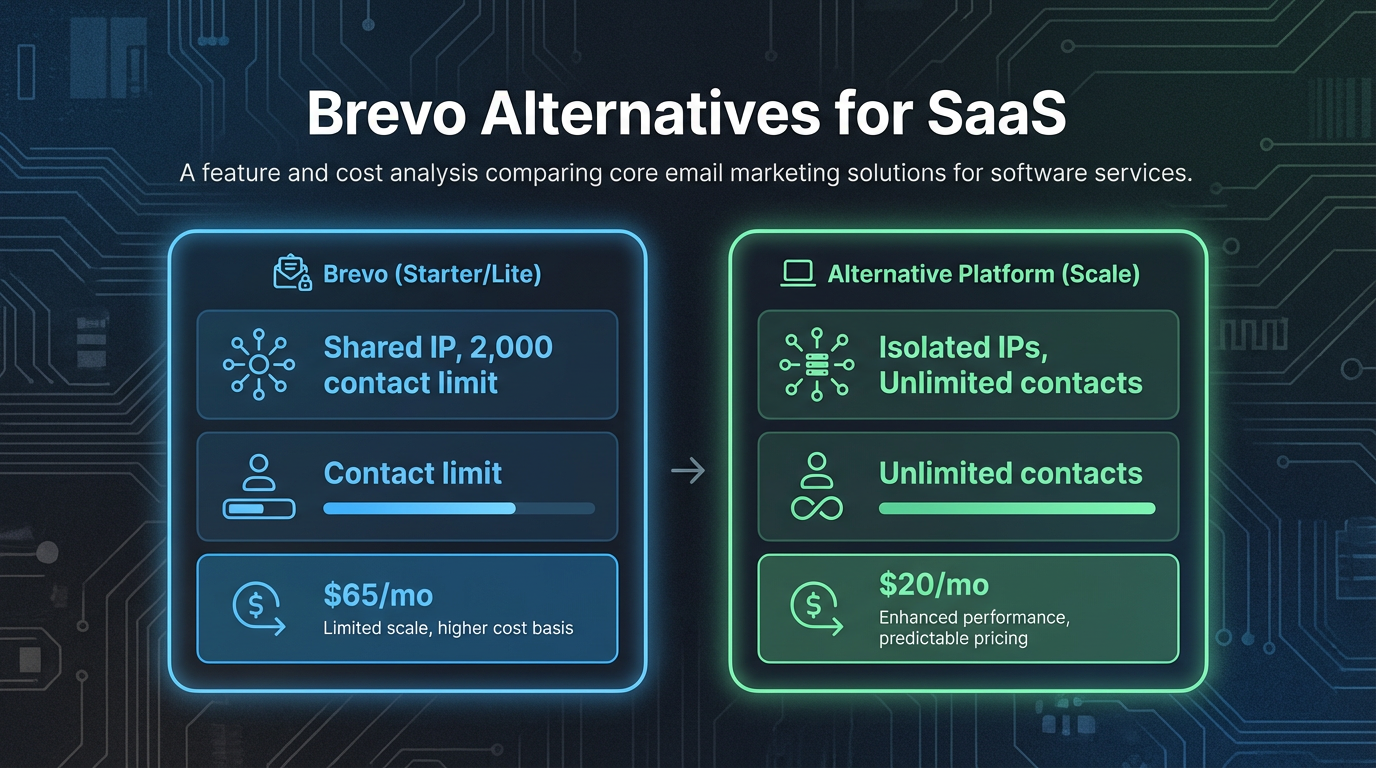
The problem is not that Brevo is broken. The problem is that Brevo was not built for the way modern technical teams deploy email infrastructure. You are forced to share IP pools with thousands of other senders, you hit feature limits on automation workflows at exactly the tier where your contact volume explodes, and you pay per seat when your ops team needs dashboard access only once a week.
This article covers the specific engineering and cost bottlenecks that technical teams encounter on Brevo, and provides a concrete migration path to infrastructure designed for SaaS and developer-first use cases.
Why technical teams outgrow Brevo
Brevo Review 2026: Why I’m sticking with Brevo 5 years on by EmailTooltester
Reputation isolation is the practice of ensuring your sending IP addresses are not shared with other senders, so that another company's deliverability problems cannot affect your inbox placement rates.
Brevo's free plan caps marketing automation at 2,000 contacts. This sounds like a non-binding limit until your user base hits 5,000 active accounts and you need to trigger automated onboarding sequences for all of them. You are pushed to upgrade before you expected to.
But the more consequential problem is Brevo's shared IP pool. All Brevo customers who are not paying for dedicated IPs share sending infrastructure. This means your legitimate transactional emails (password resets, order confirmations, OTP codes) leave from the same IP addresses as marketing campaigns from businesses you have never heard of. If any of those businesses damage their sender reputation, your inbox placement rates suffer as collateral damage. You have no control and no isolation.
When a sender on a shared IP gets blacklisted, your ability to reach customer inboxes degrades even though you followed all authentication best practices. Email providers like Gmail and Outlook use shared IP reputation as one signal for inbox placement, and one bad actor can affect everyone on that IP.
Transactional email latency is a secondary but measurable concern. Password reset links should arrive within seconds for a good user experience. Shared infrastructure means you are competing for capacity during traffic spikes. A neighbor's marketing campaign surge can introduce latency into your critical path.
The final bottleneck is pricing scalability. Brevo's per-contact pricing makes sense for a marketing team managing static lists. It becomes irrational for engineering teams deploying multi-step automated sequences where contact counts inflate quickly across workflows. According to research from Sender.net, this pricing model targets users who feel the scalability is too steep for high-volume senders.
How inbound email capabilities compare across providers
Brevo's inbound capabilities are limited to basic forwarding rules. You can forward emails to a single address or route them to a support desk. You cannot programmatically access parsed email content through webhooks. This matters if you are building a helpdesk integration, a support ticket automation system, or a workflow that grabs customer replies and routes them to the right team member based on content analysis.
Brevo Review & Tutorial 2026 | Pros, Cons, and Tips by OneHourProfessor
Mailgun's inbound parsing is widely used for this purpose. Mailgun receives an email at a URL you control, parses the message content, attachments, and metadata, and sends a webhook to your application with the full decoded payload. You can extract the sender's email, subject, body, and attachment filenames in a single JSON request. This enables workflows that are not possible on Brevo: automatically creating support tickets from customer emails, extracting invoice data from scanned documents, or triggering internal workflows based on reply content.
Postmark handles inbound similarly. It receives emails at a subdomain you specify, parses the message, and forwards a webhook payload to your application. The webhook includes the raw email body, extracted sender, timestamp, and attachment URLs. This is sufficient for most SaaS inbound workflows.
AWS SES does not offer managed inbound parsing as a standalone service. You configure receipt rule sets and Lambda functions to process inbound email. This approach requires more setup upfront but gives you complete control over the parsing pipeline. You own the code and can customize behavior entirely.
When evaluating inbound capabilities, test the webhook payload format. Check whether the service returns the email body as raw MIME, plaintext, and HTML variants. Confirm that attachment filenames and MIME types are passed through. Verify that sender authentication signals (SPF pass, DKIM pass, DMARC alignment) are included in the webhook metadata, so you can make security decisions in your application without re-checking DNS.
Top 5 Brevo alternatives for API latency and uptime
Top 5 Brevo Alternatives & Competitors by Alternatives Co
The best Brevo alternatives for technical teams perform well on three measurable criteria: sub-200 millisecond API latency for transactional sends, reputation isolation that prevents other senders from degrading your inbox placement, and documented SLA guarantees with financial penalties for breaches.
Mailgun is a widely-used transactional API with points of presence in the US and EU. Their API response times for sending requests are generally sub-200 milliseconds. On standard plans, Mailgun uses shared IP pools; dedicated IPs are available as an add-on for customers who need reputation isolation. Their standard API SLA is 99.9% uptime with service credits for breaches. Mailgun's pricing is volume-based with per-recipient overage fees above your plan's monthly cap, so costs at high volumes can climb faster than flat-rate alternatives.
Postmark is optimized specifically for transactional email. Their API latency is consistently under 200 milliseconds for sending requests. Postmark offers per-sending-domain reputation tracking, meaning if you have multiple customer-facing domains, each domain's inbox placement is tracked separately. This is useful for SaaS platforms with customer-specific sending domains. Postmark provides a 99.5% uptime SLA and supports both REST API and SMTP relay. For developers integrating via SMTP (Django apps, Rails apps, WordPress), Postmark's SMTP support is simpler than some competitors.
AWS SES (Simple Email Service) has the lowest marginal cost of any provider. AWS SES charges $0.10 per 1,000 emails sent, so 500,000 emails per month costs roughly $50 in send fees before data transfer. The catch is operational overhead. By default, SES uses shared IPs, but you can provision dedicated IPs and configure IP pools for reputation isolation. You must manage domain verification, DKIM/SPF/DMARC setup, bounce handling, and complaint monitoring yourself or through third-party tooling. AWS SES provides no built-in dashboard for reputation tracking or analytics. You integrate via boto3 (Python), aws-sdk (Node.js), or raw SMTP relay.
MailerSend is positioned specifically at SaaS builders and developers. Their API latency is under 200 milliseconds. MailerSend includes domain warmup automation that gradually increases your daily sending limit from a newly-verified domain, which is valuable for avoiding early spam filter friction. Reputation isolation is available, and pricing is volume-based rather than seat-based.
SendGrid is a long-standing option with broad ecosystem support. Their API latency is under 200 milliseconds. SendGrid's strengths are template versioning and A/B testing for marketing workflows. For pure transactional use cases, faster and simpler alternatives like Postmark have become more popular with developer teams.
| Provider | API latency | Reputation isolation | Inbound parsing | SOC 2 certified | Best for |
|---|---|---|---|---|---|
| Mailgun | <200ms | Dedicated IPs add-on | Yes, webhooks with raw MIME | Yes | High-volume transactional |
| Postmark | <200ms | Per-domain tracking | Yes, webhooks | Yes | Transactional + SMTP |
| AWS SES | <200ms | Configurable via dedicated IPs | Manual via receipt rules + Lambda | Yes | Cost-optimized, self-managed |
| MailerSend | <200ms | Yes | Limited | Yes | Domain warmup automation |
| SendGrid | <200ms | Dedicated IPs add-on | Yes | Yes | Marketing + transactional |
Evaluating open source and self-hosted options
Self-hosting email infrastructure gives you complete control and eliminates vendor lock-in. It also eliminates the vendor's reputation management and deliverability expertise. The tradeoff is not trivial.
Open source stacks like Postal, Mautic, and OpenSMTPD let you run your own SMTP relay on your own servers. You control the IP addresses, the DNS records, the bounce handling, and the authentication setup entirely. The marginal cost is near zero if you have spare server capacity. The setup cost is real. You must configure SPF, DKIM, DMARC, and PTR records for each sending domain. You must monitor bounce rates and complaint rates manually. You must implement list suppression logic yourself. You must handle credential rotation and key management. If your infrastructure provider blacklists your IP, there is no support escalation path.
A middle ground is the Bring Your Own Key (BYOK) model. With BYOK, you connect your own AWS account to an email platform, and the platform sends email through your own AWS SES infrastructure. You own the AWS credentials and can revoke them instantly. Because the sending IP addresses are provisioned from your AWS account, your sending reputation is isolated to your account and cannot be contaminated by other platform customers.
BYOK removes two categories of risk. First, you eliminate shared IP pool contamination. Second, you eliminate vendor lock-in at the infrastructure layer. If you switch platforms, you retain your AWS SES account, your bounce data, your authentication setup, and your IP reputation.
Setup is straightforward. You create an AWS IAM role with SES permissions, copy the role ARN into the platform's settings, and the platform deploys infrastructure against your role. No servers to configure and no SSH access needed. Transmit's BYOK setup uses this exact pattern, combining your AWS credentials with built-in domain warmup and reputation isolation tooling so you get infrastructure control without the operational overhead of running mail servers directly.
How to migrate suppression lists from Brevo without triggering spam filters
Your existing bounce and complaint lists must migrate to your new platform before your first send. Brevo customers often skip this step. When they do, addresses that bounced on Brevo also bounce on the new platform on day one, which creates the false impression that the new platform has worse deliverability.
Export your suppression list from Brevo's Contacts section as a CSV file. The export includes the email address, suppression reason (bounce, complaint, unsubscribe), and suppression date. Download this file.
Import the CSV into your new platform before sending any campaigns. Most platforms accept CSV imports with a column mapping step. Map the email address column to the email field, the suppression reason to a suppression type field, and optionally the suppression date to a metadata field. This tells your new platform to suppress these addresses from the moment you start sending.
Timing matters here. If you import your suppression list after sending a batch, any address that bounced on Brevo will also bounce on your new platform. That double bounce damages your reputation on the new infrastructure. Pre-import suppression lists before your first send, even if that means delaying your migration by a day.
For API-based migration, most platforms expose a bulk suppression import endpoint. Mailgun and Postmark both accept POST requests containing a CSV file to suppress addresses in bulk. Submit the request and the suppression list updates within minutes.
If Brevo has exported only a subset of suppressions, get the full picture. Log into Brevo's dashboard, navigate to Contacts, and export unsubscribed addresses, bounced addresses, and complaint addresses separately. Combine the three CSVs into a single file before importing. This captures every address that ever had a problem with your Brevo account.
Note: suppression metadata (bounce reasons, complaint timestamps) can be exported and imported this way, but full message history (email content, delivery logs) stays with Brevo. Export any compliance-relevant logs from Brevo and archive them before you close the account.
Managing the 10-lookup SPF limit during provider transition
During migration to a new email platform, you run both Brevo and your new provider in parallel for a period. Your DNS SPF record must authorize both providers' sending servers so that emails from either platform pass SPF validation. A hidden constraint appears here: SPF records allow a maximum of 10 DNS lookups per domain.
SPF validation works by querying DNS for your domain's SPF record, reading the list of authorized sending IP ranges, and checking if the sending server belongs to one of those ranges. Some SPF entries require multiple DNS lookups to resolve. If your record says include:sendgrid.net, the receiving mail server must query DNS for sendgrid.net's SPF record, which itself contains IP ranges or further includes. Each of these counts as a lookup.
The 10-lookup limit is strict. If your SPF record requires 11 lookups, mail servers silently fail the SPF validation. Your emails are not rejected outright. They simply fail SPF authentication, making them more likely to be filtered, especially on reputation-sensitive providers like Gmail.
To manage the limit, flatten your SPF record before migration. Instead of including multiple providers' SPF records directly, consolidate their IP ranges into a single SPF entry for your domain. Run dig +short txt yourdomain.com to retrieve your current SPF record and count the includes. Each include directive counts toward the 10-lookup budget, as does each PTR lookup.
If you are running Brevo, a new provider, and AWS SES simultaneously, you may be close to the limit depending on what else is in your record. Add your new provider's SPF entry, verify the count does not exceed 10 with the dig command, and run the record through a free SPF validation tool before making it live.
Once migration is complete and Brevo is no longer sending email on your behalf, remove Brevo's SPF include immediately. This frees lookup budget for future additions.
The true cost of seat-based pricing vs volume pricing
Brevo charges per seat for dashboard access. According to Brevo's current pricing documentation, each additional marketing seat costs $9 per month. For a startup with 8 engineers, 2 operations staff, and 1 product manager who all need dashboard access, that is 11 seats at $9 each, totaling $99 per month just for access, before a single email is sent.
Volume-based pricing charges only for emails sent. Your team size does not affect the bill. An ops intern and a VP of engineering both use the same API endpoint, and the cost is determined by how many emails go out, not how many people log in.
For a SaaS platform sending 500,000 emails per month to 50,000 active users with 10 team members, the Brevo cost includes the seat fees on top of send volume costs. Volume-based alternatives like Mailgun or AWS SES fold all of that into a single email-volume figure. At $0.10 per 1,000 emails, 500,000 emails costs $50 in send fees with no seat component at all.
Seat-based pricing makes sense for marketing teams where only two or three people need dashboard access. It becomes expensive the moment your engineering org needs to debug email sends. One engineer spending two hours reviewing delivery logs in Brevo costs $9 per month for that access, which adds up across a team over time. GrowthFolks.io found that budget-focused teams often prioritize volume-based models to avoid these hidden costs.
When evaluating a new email platform, calculate the monthly cost for your specific volume and your specific team size. Confirm whether the vendor charges per user separately from per email. If they do not charge per user, you have a volume-based model. If they do, multiply your team headcount by the per-seat cost and add it to your send volume costs before comparing.
Related Reading
- Compare Transmit to Other Email Platforms – See how Transmit stacks up against Brevo and other providers.
- Email Platform Comparisons - X vs Y – Detailed head-to-head comparisons of top email platforms.
- Alternatives to Beehiiv – Explore options for newsletter and email marketing tools.
Frequently asked questions
What is reputation isolation and why does it matter?
Reputation isolation means your sending IP addresses are not shared with other customers, so another sender's spam complaints or blacklistings cannot degrade your inbox placement rates. On shared IP pools, one sender's reputation problems can affect everyone on that IP. For SaaS platforms sending transactional email, a sudden drop in inbox placement caused by an unrelated sender is both difficult to diagnose and impossible to prevent without isolation. BYOK models, where you provision your own AWS SES dedicated IPs, guarantee that your reputation is entirely yours.
Can I migrate from Brevo to a new provider without losing email history?
Email content and delivery logs stay with Brevo and cannot be transferred to a new provider. What you can migrate is suppression metadata: bounce reasons, complaint flags, and unsubscribe records. Export these from Brevo before switching and import them into your new platform before your first send. Archive Brevo's delivery logs separately if you need them for compliance purposes.
How long does domain warmup take?
A new domain typically starts with low sending limits from mailbox providers. Warmup automation gradually increases daily volume, starting around 100 emails per day and ramping up over roughly 30 days if bounce rates stay low. High bounce rates pause the warmup, which extends the timeline. The exact ramp curve depends on your provider and your bounce rate performance during warmup.
What happens if I do not migrate my suppression list from Brevo?
Addresses that bounced on Brevo will bounce again on your new platform. Each bounce on the new platform counts against your sender reputation there, even though the underlying problem is an old address list. Always import suppression lists before your first send on the new platform.
How do I know if my SPF record exceeds the 10-lookup limit?
Run dig +short txt yourdomain.com to retrieve your SPF record. Count each include directive. Use a free SPF validation tool to get an exact lookup count. Most modern SPF checkers will flag records that exceed 10 lookups and identify which directives are causing the excess.
Should I move to open source email infrastructure to avoid vendor lock-in?
Open source moves lock-in from the vendor to your own ops team. You own the code and the servers, but you also own the maintenance burden, security patching, and deliverability troubleshooting. For most SaaS teams, that operational overhead exceeds the cost savings. A BYOK model offers a practical middle ground: you control the AWS credentials and own the sending reputation, but the platform handles SMTP relay complexity, warmup automation, and bounce processing on your behalf.