An Amazon SES alternative is a managed email delivery platform that replaces AWS SES infrastructure, eliminating manual bounce handling, webhook configuration, and reputation management while preserving or improving deliverability. Top options include Postmark, Mailgun, Resend, SendGrid, Brevo, and MailerSend, each trading raw cost efficiency for operational simplicity and built-in infrastructure.
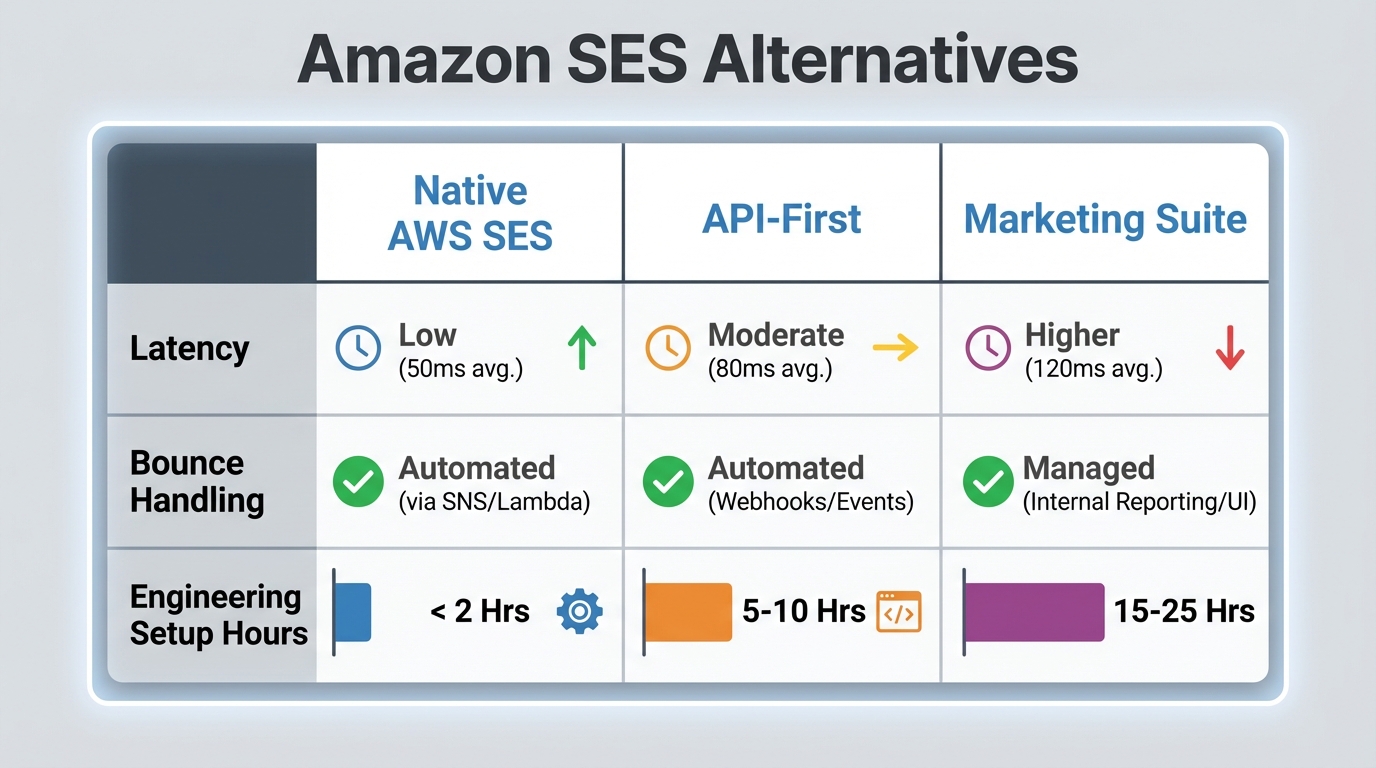
Amazon SES starts at $0.10 per 1,000 emails for the first 10 million emails per month, dropping to lower rates at higher volumes, with additional fees for attachments and raw message data. On the surface, that makes it among the cheapest email infrastructure available. But that pricing ignores the hidden cost: engineering time. A developer building a production email system on top of Amazon SES must wire up Lambda functions to handle bounces, SNS topics to route webhooks, DynamoDB tables to track suppression lists, and CloudWatch logging to monitor delivery. That is not five minutes of setup. That is days of infrastructure work, environment-specific configuration, and ongoing maintenance.
This article compares the true financial and technical trade-offs of DIY email infrastructure versus managed alternatives, with specific focus on API latency, reputation isolation, and the exact process for migrating your suppression data.
Comparison table: infrastructure capabilities and pricing
| Provider | Base Pricing | Dedicated IP Cost | API Latency | Free Tier | Best For |
|---|---|---|---|---|---|
| Amazon SES | $0.10/1k (first 10M/mo) | Competitive; verify on AWS pricing page | ~150–250ms raw API | 62k emails/day (EC2) | Price-conscious teams with DevOps capacity |
| Postmark | ~$15/mo (10k emails) | See postmarkapp.com/pricing | Fast; optimized for transactional | None | Transactional-only high-reliability use cases |
| Mailgun | Pay-as-you-go with free elements | Available on paid plans | Fast to moderate | Verify at mailgun.com | Complex inbound routing and Parse API workflows |
| Resend | Verify at resend.com/pricing | Available on paid plans | Edge-optimized | Free tier available | Modern developer stacks with React email templates |
| SendGrid | ~$19.95/mo (50k emails) | Additional cost on paid plans | Moderate | Testing tier available | High-volume marketing with managed IP warmup |
| Brevo | Free tier available | ~$15/mo | Moderate | 300 emails/day | Large contact lists with seasonal send volume |
Note: pricing and feature details change frequently. Always verify current figures on each provider's official pricing page before committing.
NEW Postmark vs Amazon SES — Best High-Delivery Transactional Email for Startups by How2Genius*
What are the hidden engineering costs of Amazon SES?
Building production email infrastructure on Amazon SES requires assembling multiple AWS services, each adding operational overhead. A minimal SES setup involves four core components: SES itself for sending, Lambda for bounce processing, SNS for event routing, and either DynamoDB or S3 for suppression storage.
The Lambda component processes bounces and complaints pulled from your SNS topics. Each Lambda function requires IAM role configuration, environment variables for database credentials, VPC networking if accessing private databases, and error handling for failed invocations. These functions must be monitored; CloudWatch Logs bill for ingestion and retention (currently around $0.60 per GB ingested for the first 10TB, per AWS pricing). A developer can easily spend a week on initial setup and then return repeatedly over the following months to patch bugs, upgrade Node.js or Python runtimes, and debug timeout issues.
Suppression list management adds another layer. SES does not maintain a unified suppression list; you must manually enforce bounces and complaints by either querying your own database on every API call or pre-filtering your recipient list. If you query DynamoDB on each send, you add latency. If you pre-filter from S3 batch files, you add operational complexity. Neither option is automated. Mailgun and Postmark handle this internally; their systems query suppression data without touching your application code.
Reputation issues multiply when managing infrastructure yourself. If your Lambda bounce processor crashes or falls behind, your suppression list becomes stale. New send attempts hit already-bounced addresses, damaging sender reputation. Reputation recovery takes weeks. Managed platforms isolate your sending reputation automatically; a crash in their infrastructure does not affect your domain.
The real cost of SES is not the $0.10 per thousand emails. It is the engineering hours spent building and maintaining the surrounding infrastructure, hours that do not ship product features. For any team where developer time has meaningful opportunity cost, that math shifts quickly toward managed alternatives in the $20 to $100 per month range. According to research from Mailtrap, teams often underestimate the long-term maintenance burden of SES, leading to higher total costs than anticipated.
Amazon SES Review | Pros and Cons – Watch Before Using by How To Mr
How to evaluate an alternative to AWS SES
Evaluating an email alternative requires comparing infrastructure constraints that directly affect application performance and deliverability. Four metrics matter most: REST API latency (especially P99), SDK availability, reputation isolation architecture, and native inbox placement tools.
API latency is critical for transactional email. SES's raw API response time is roughly 150 to 250ms, but that number climbs significantly when Lambda cold starts are involved in your bounce-processing flow. A first invocation cold start on Lambda can add one to three seconds to your overall pipeline, making end-to-end latency unpredictable from the application's perspective. Managed platforms remove that variable by handling bounce processing server-side. For transactional flows, measure latency using your provider's test API and simulate typical payload sizes; a password reset email is much smaller than a complex invoice template.
SDK availability matters when your stack has constraints. If you are running Node.js on Vercel Edge Functions, you need an SDK built for bundled environments. Resend and Postmark ship lightweight SDKs designed for edge runtimes. SES requires AWS SDK imports that bloat bundle sizes. Mailgun offers well-documented REST endpoints; SendGrid provides mature Node.js and Python libraries but has paid less attention to edge runtimes historically.
Reputation isolation protects your sender score when other customers on the same infrastructure misbehave. Amazon SES pools reputation by default; your domain shares IP reputation with other senders. SES offers dedicated IPs at an additional monthly cost (verify current pricing on the AWS pricing page), but you still share reputation when warming new IPs. Postmark isolates reputation per sending stream automatically.
Inbox placement tools determine whether recipients see your email at all. Email validation before sending prevents bounces. Domain warmup automation accelerates IP reputation building; SendGrid and Postmark handle this natively, while SES requires manual limit increases and hand-managed sending curves. DMARC and DKIM setup should be straightforward; all major alternatives offer DNS guidance, but SES requires manual Route 53 configuration.
Postmark: prioritizing transactional speed
Postmark specializes in transactional email, deliberately excluding marketing tools to optimize for reliability and speed. The platform separates transactional and broadcast streams entirely; a bounce on a newsletter does not affect your password-reset delivery reputation.
Postmark is known for fast API response times, with their public documentation targeting 99% of requests served in under 200ms. This consistency comes from regional infrastructure and pre-warming strategies. For comparison, SES's raw API latency is competitive in isolation, but the surrounding Lambda and SNS architecture introduces variance that Postmark eliminates entirely.
Bounce handling is automatic. Post an email to Postmark's API and invalid addresses are rejected immediately with a descriptive error code. Valid emails are sent, and bounces or complaints are delivered via webhook within seconds. You do not configure SNS topics or Lambda functions; bounces land in your webhook queue and are processed by your application code directly.
Postmark stores message content and event history for search and audit purposes. The exact retention window varies by plan; check postmarkapp.com/pricing for current figures. For compliance use cases where audit trails matter, built-in retention is meaningfully easier than maintaining your own log storage in S3 or CloudWatch.
Pricing starts around $15 per month for 10,000 transactional emails (verify current rates at postmarkapp.com/pricing). There is no free tier, but the entry-level plan covers small SaaS onboarding flows. Postmark is best for teams that want email delivery to be a solved problem rather than an infrastructure project.
Mailgun: SLAs and enterprise email routing
Mailgun appeals to teams needing complex inbound and outbound workflows. Their Parse API routes incoming emails to your application, enabling ticket systems, support automation, and reply-to-email workflows that SES cannot match without significant custom development.
Mailgun publishes a 99.99% uptime SLA for enterprise customers. SES offers no equivalent SLA; it is best-effort. If SES experiences regional degradation, you have no recourse. That contractual baseline matters for IT procurement at larger organizations.
Email validation is integrated into Mailgun's API, checking syntax, MX records, and disposable email detection server-side. This reduces bounce rates compared to SES, where you must validate addresses yourself using external APIs or custom logic.
Mailgun supports high-throughput sending for enterprise customers. Specific burst limits depend on your plan and are best confirmed directly with their team, but the platform is designed for batch export notifications, daily digest campaigns, and bulk operations that overwhelm smaller managed platforms.
Mailgun's pay-as-you-go model includes a free tier with limited daily sends (verify current limits at mailgun.com). For inbound routing specifically, Mailgun is considerably simpler than wiring together Lambda and SNS to handle the same capability.
Resend: developer experience and React email
Resend targets developers building applications on modern JavaScript stacks. The platform ships a React component library that renders emails server-side, eliminating HTML template maintenance and version control headaches.
Resend deploys infrastructure globally so API calls route to the geographically closest endpoint. SDKs are optimized for edge runtimes like Vercel Edge Functions and Cloudflare Workers, resulting in smaller bundle sizes compared to AWS SDK implementations.
The React email workflow changes how templates are managed. Instead of maintaining .mjml or .html partials with merge-tag syntax, you write JSX components with props. Version control tracks email templates alongside application code using the same git workflow. Adding a variable to an email template is a prop addition, not a template syntax hunt.
Reputation isolation separates transactional emails from marketing by default, so a bounce on your newsletter does not degrade your OTP delivery reputation.
Resend offers a free tier and paid plans; check resend.com/pricing for current figures. Dedicated IPs are available on paid plans. Resend is well-suited for Node.js-first startups shipping quickly; the React integration cuts template management time substantially.
SendGrid: scaling massive marketing volumes
SendGrid handles high-volume marketing email and specializes in managing reputation at scale across multiple sending domains and IP pools.
SendGrid's managed IP warmup automatically increases sending limits based on reputation signals. Unlike SES, where you manually request limit increases from AWS support, SendGrid's system observes bounce rates and complaint rates, then automatically ramps sending volume based on those signals. You define warmup parameters and the system executes the ramp. This feature is available on Pro and higher plans; verify specifics at sendgrid.com/pricing.
Multiple IP pools and sending domains allow reputation separation per campaign or customer segment in multi-tenant SaaS. Note that shared IP pools, available on lower-tier plans, mean multiple senders share reputation. Dedicated IPs, which fully isolate your reputation, are an add-on cost. If you need guaranteed isolation, verify which plan tier provides dedicated IPs before committing.
SendGrid's marketing campaign builder is visual and no-code, enabling non-technical team members to design emails without touching code. That is useful in growing teams where marketers handle newsletters independently.
Pricing starts around $19.95 per month for 50,000 emails, with dedicated IPs available at an additional cost (verify current rates at sendgrid.com/pricing). A testing-level free tier exists. For marketing email, SendGrid's managed warmup and multi-domain reputation tooling is the most mature option in this list. As Sender.net highlights, tools like SendGrid simplify migration for teams that have outgrown SES by reducing engineering overhead.
Amazon SES | Best 35 Alternatives of Amazon SES by Black Eye Apptroid - Top Apps & Games
How to migrate suppression lists away from AWS SNS
Migrating off SES requires exporting your bounce and complaint data before switching providers. If you skip this step, your new provider has no knowledge of previously bounced addresses and you will hit them again on your first send, damaging your reputation on the new platform before it is even established.
First, identify where your suppression data lives. If you configured SNS topics for bounce and complaint notifications in SES settings, SNS delivers events as JSON messages. If you subscribed those topics to SQS or Lambda, the data was processed and stored in your application database, likely DynamoDB or PostgreSQL. Identify which store is authoritative.
If data is in DynamoDB, export the table via the AWS console. Navigate to DynamoDB, select your table, choose "Export to S3", and specify an S3 bucket. AWS exports data as Parquet files. You can convert these to CSV using Python's pandas library or the parquet-tools CLI. Example:
python -m parquet_tools cat bounces.parquet > bounces.csvIf data is in S3 as archived SNS event JSON, retrieve the objects and parse them with a script that extracts email address and bounce type (permanent or transient), then writes to CSV. Permanent bounces belong in hard-bounce suppression; transient bounces are candidates for a retry check before resending.
For SQS-based flows, retrieve messages from the queue before they expire. If the queue is active, use a dead-letter queue copy if available rather than consuming from the live queue.
Once you have a CSV, most managed providers accept bulk suppression imports via API or dashboard. SendGrid's /v3/suppression/bounces endpoint accepts a JSON array. Note that the created field expects an ISO 8601 timestamp string, not a Unix integer:
POST https://api.sendgrid.com/v3/suppression/bounces
{
  "bounces": [
    {"email": "user@example.com", "created": "2024-01-15T00:00:00Z"},
    {"email": "other@example.com", "created": "2024-01-16T00:00:00Z"}
  ]
}
Mailgun's /v3/[domain]/bounces endpoint works similarly. Postmark provides a bounces import endpoint in their bounce API; consult postmarkapp.com/developer/api/bounce-api for the current schema.
Before cutting over, test import with a small subset (500 to 1,000 addresses) to verify field mapping and catch validation errors. Most providers reject malformed entries silently, so run a second import pass for any rows that did not appear after the first.
Import your suppression list at least one to two days before switching your application to the new provider. That buffer gives you time to catch validation issues and correct them without disrupting active sending.
Related Reading
- Comparing SES wrappers – How teams reduce SES complexity with abstraction layers.
- The Linear Scaling Trap – Why infrastructure costs grow faster than revenue.
- Email Platform Alternatives – Broader comparison of email platforms beyond SES.
Frequently asked questions
How much does API latency actually matter for marketing email?
For marketing email, end-users are not latency-sensitive because sends are typically queued and processed asynchronously. The latency figure affects your batch processing time on the sending side, not the user's experience. If you are sending thousands of emails in a loop, slower API responses accumulate and extend your job runtime. For transactional email, latency directly affects the user: a password reset confirmation that takes an extra second to dispatch is noticeable.
Can you use Amazon SES with a managed provider's interface?
Yes. Some platforms support bring-your-own-key (BYOK) infrastructure where you provide AWS credentials and the platform sends through your SES account. This preserves SES's per-email pricing while adding managed bounce handling, domain warmup, reputation isolation, and webhooks on top. The tradeoff: you keep SES's underlying latency characteristics and remain dependent on AWS infrastructure; you gain operational tooling you would otherwise build yourself. BYOK is practical if you are already committed to AWS and want managed features without changing your sending account. As Sequenzy.com notes, hybrid solutions can bridge the gap for teams needing AI capabilities or Stripe integrations.
What happens to my sender reputation if I switch email providers?
Sender reputation is tied to your domain's SPF, DKIM, and DMARC records and the IP addresses used for sending. When you switch providers, your domain reputation persists because it is based on your domain, not the provider's infrastructure. However, if the new provider uses shared IPs, your emails share reputation with that provider's other customers. Most managed providers address this by offering dedicated IPs or dedicated infrastructure per customer. New dedicated IPs require warmup; expect one to two weeks of gradually increasing send volume to build reputation with ISPs. Managed alternatives typically automate this process; SES requires you to manage it manually.
How do I prevent emails from going to spam after switching?
Before switching, verify DNS records are correctly configured. Use the DNS checker tool your new provider offers to validate SPF, DKIM, and DMARC records before the cutover. Deploy new records at least 24 hours before sending through the new provider, giving ISPs time to cache them. Send test emails to major ISPs (Gmail, Outlook, Yahoo) from the new provider and confirm inbox delivery before pointing production traffic there. Most managed providers offer deliverability monitoring as part of paid plans.
Is SES still the right choice for any use case?
SES makes sense if you are already running on AWS infrastructure and have DevOps capacity to maintain bounce handling and suppression logic; if you have extremely high volume and can justify the engineering overhead against the per-email cost savings; or if you need maximum control for compliance reasons (HIPAA, PCI) and prefer self-hosted approaches. For most other cases, a managed alternative saves meaningful engineering time. According to SoftwareTestingHelp, SES remains viable for teams with strict compliance requirements or those already deeply embedded in the AWS ecosystem.